
Cleanup, names and summaries
After a recording is transcribed, a language model can clean up its transcript, and a model (the same or another) can write a short name and a summary for it. Nothing happens until you store a key, or start a model server on the Mac, and choose a model.
Choosing the models
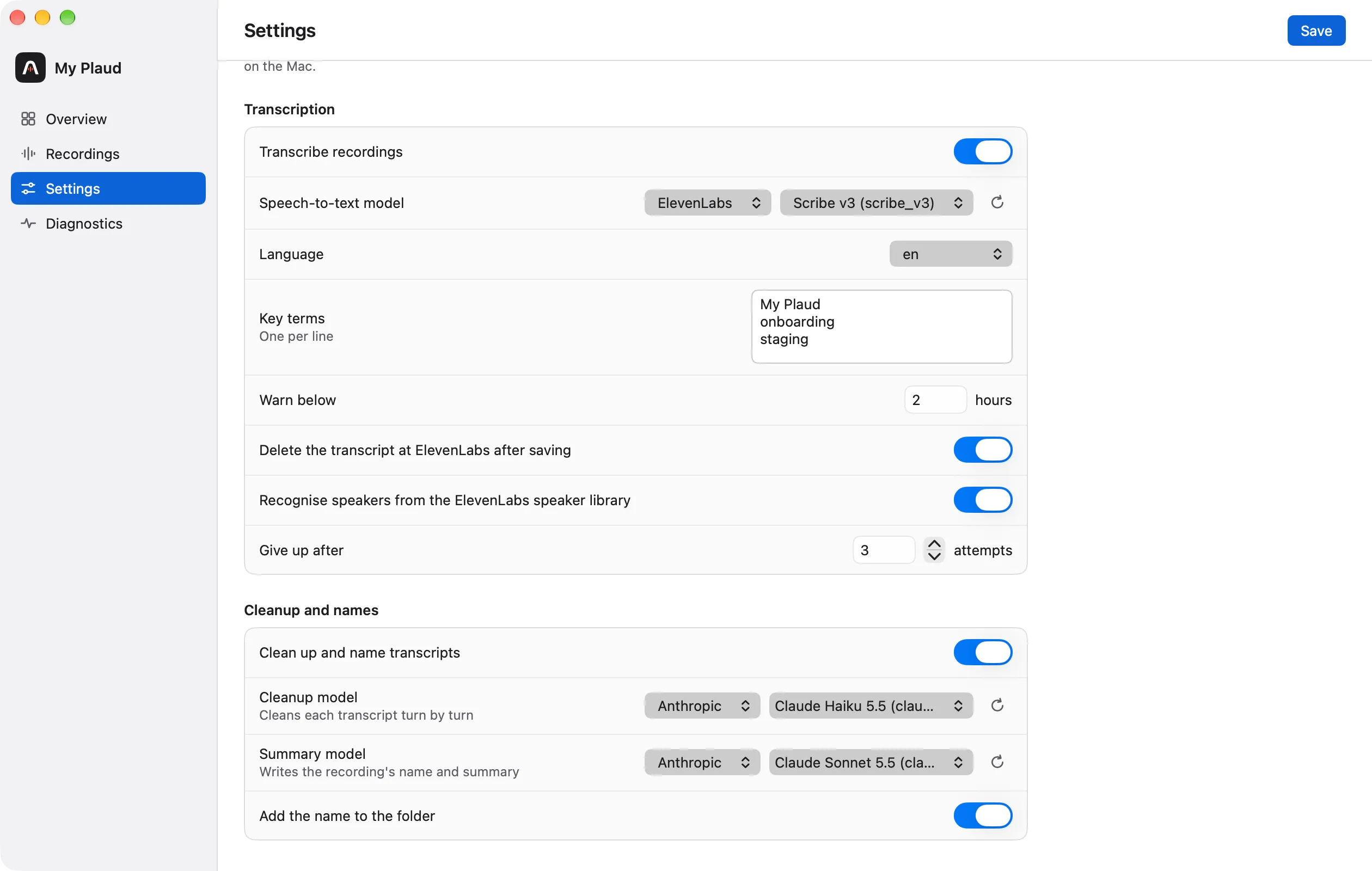
In Settings, Cleanup and names:
- Clean up and name transcripts turns the feature on or off.
- Cleanup model and Summary model: each a provider and one of its models. None turns that step off. The two may use different providers.
- Add the name to the folder, on by default.
The providers are Anthropic, OpenAI and OpenRouter, each with its key in API keys, and Local, which needs none. The model lists are loaded from the providers; a list of more than 15 models opens with a search field.
What happens
Every sync ends with a processing pass over every transcript not processed yet, oldest first. A pass stops starting recordings after 15 minutes; the rest follow at the next sync.
Cleanup
The model fixes punctuation, capitalisation, obvious mis-recognitions and broken sentences, and removes filler words, stutters and false starts. A turn of filler only is left out.
Speaker labels and times never pass through the model, so they stay as the transcription gave them. An answer that does not return every turn, or whose length differs too much from the original, is not used. The raw transcript is kept beside the cleaned one.
Summary and name
The summary model reads the transcript as transcript.md shows it and writes a name of a few words and a summary, stored as summary.md. While a recording’s cleanup is chosen but not done, its summary waits, so both come from the text you read.
The name shows in the Name column of Recordings and, with “Add the name to the folder” on, after the date and time of the folder: 2026-11-19_1455 Website relaunch kickoff. A name you give a recording yourself wins over the generated one.
Once per transcript
Each step is done once per transcript. Changing a model or a setting processes nothing again. A recording is cleaned and summarised again only when it is transcribed again; Regenerate summary… in the recording detail writes one summary again on request.
A model on this Mac (Local)
Local is a model server on this Mac that speaks the OpenAI chat API. It has no key, and the text it cleans and summarises does not leave the Mac.
The documented server is LM Studio: install it, download a model, load it and start its server. The app expects it at http://localhost:1234; another address goes in the Local server field, shown in Settings while Local is chosen. The app does not download, load or start a model.
- The model list is what the server offers, so load the model you want to use.
- Load it with a context length that covers your longest transcript: the summary sends the whole transcript at once.
- A model on the Mac is far slower than a hosted one, so its requests may take up to 30 minutes each.
- When the server is not running, Local’s steps wait and a warning says so; they run at the first sync after you start it.
Cost
Each provider bills its own account by the text sent and returned; Local costs nothing but time. Each transcript is processed once: cleanup sends the text and gets it back, the summary sends it once more. The app shows no estimate. As a guide, an archive of about seven hours of audio was estimated at a few dollars at most with a mid-priced model.
Turning it off
Turn off Clean up and name transcripts, set both models to None, or remove the keys. Files already written stay. To stop only the folder names, turn off Add the name to the folder; existing names are not removed from the folders.